|  |
Showing posts with label Kali Linux. Show all posts
Showing posts with label Kali Linux. Show all posts
Tuesday, 20 May 2014
Here Are The Top 8 Hacker Centric Operating Systems!
Posted by krishna in: Computer Kali Linux Linux20 things to do after installing Kali Linux
Posted by krishna in: Computer Kali Linux Linux
I've compiled a small list of things that I always perform after installing a fresh copy of Kali Linux in this post. Because I got multiple laptops and workstations, I’ve tried to generalize the following instructions to suit everyone’s(including mine??) requirements. This is my top list of 20 things to do after installing Kali Linux. Your requirement’s might be completely different. If you have a suggestion, let me know via comments section. You can comment without registering.. so that’s an easy way to give me feedback and opinion.
Change Install Theme in Kali Linux – GTK 3 themes
Posted by krishna in: Kali Linux Linux
Kali Linux default GNOME Theme is very boring and plain. The reason it is like that is because Kali Linux Dev team wanted to make a fast and reliable environment so that you can boot your system quickly and ge to work. But work (or hacking?) is just part of it. Like you, I sometimes get bored looking into the same old desktop over and over again and feel like having a new desktop or change color here and there. If you have a decent enough graphics card and processor (and RAM??) you might want to change or install theme in Kali Linux (this guide applies to any Kali version, so don’t worry which version you have). As Kali uses GNOME3 (GDM) Window Manager, so we will stick with GTK3 themes. The whole process takes only a few minutes and by the end of that, you should be able to:
- Install theme in Kali Linux
- Change default theme in Kali Linux
- Most importantly, roll back your changes and get same old Desktop back.
I’m a big fan of being able to roll back my changes so that if I mess up things, at least I will know where to go back and how to roll back. This saves a lot of trouble for later usage. Some themes are poorly made and throws errors all over my terminal. In that case, rolling back and using a different theme is the best idea. At the same time, I prefer to remove that erroneous theme or clean up theme directory. I guess that’s sound good, so let’s get on with it.
Kali Linux add PPA repository add-apt-repository
Posted by krishna in: Kali Linux Linux
A Personal Package Archive (PPA) is a special software repository for uploading source packages to be built and published as an APT repository by Launchpad or a similar application. While the term is used exclusively within Ubuntu, Launchpad host Canonical envisions adoption beyond the Ubuntu community.
Debian allows users to add and use PPA repositories by an application named add-apt-repository however, Kali Linux didn’t include this in their default package list. With Kali, because this is a special purpose application and certain modifications were made to make it work for what it does best (Penetration Test), there’s a chance that by adding untested and unsupported PPA repositories and application you might end up breaking your installation.
However, PPA is a powerful tool to have and a lot of the specific applications that are not available in repositories are available via PPA repositories. Users should take extra care before adding unknown and random repositories as it might very well break other things. I mean, how do you know the PPA owner didn’t add some harmful code in their system? Generally, you don’t. Then again, how do you know that Linux Kernel doesn’t have something that’s spying on your activity? But I guess that doesn’t matter, your ISP would be happy enough to hand over your online activity to NSA anyway … I could go on and on, but let’s not waste more time and move to actual post “Kali Linux add PPA repository add-apt-repository” .. so here goes ..
Installing Tor in Kali Linux
Posted by krishna in: Kali Linux LinuxWhat is Tor?
Tor is free software and an open network that helps you defend against traffic analysis, a form of network surveillance that threatens personal freedom and privacy, confidential business activities and relationships, and state security. This guide guides your through installing tor in Kali Linux.
Why anonymity matters?
Tor protects you by bouncing your communications around a distributed network of relays run by volunteers all around the world: it prevents somebody watching your Internet connection from learning what sites you visit, and it prevents the sites you visit from learning your physical location.
[Source: https://www.torproject.org/]
[Source: https://www.torproject.org/]
Kali Linux add PPA repository add-apt-repository
Posted by krishna in: Kali Linux LinuxA Personal Package Archive (PPA) is a special software repository for uploading source packages to be built and published as an APT repository by Launchpad or a similar application. While the term is used exclusively within Ubuntu, Launchpad host Canonical envisions adoption beyond the Ubuntu community.
Debian allows users to add and use PPA repositories by an application named add-apt-repository however, Kali Linux didn’t include this in their default package list. With Kali, because this is a special purpose application and certain modifications were made to make it work for what it does best (Penetration Test), there’s a chance that by adding untested and unsupported PPA repositories and application you might end up breaking your installation.
However, PPA is a powerful tool to have and a lot of the specific applications that are not available in repositories are available via PPA repositories. Users should take extra care before adding unknown and random repositories as it might very well break other things. I mean, how do you know the PPA owner didn’t add some harmful code in their system? Generally, you don’t. Then again, how do you know that Linux Kernel doesn’t have something that’s spying on your activity? But I guess that doesn’t matter, your ISP would be happy enough to hand over your online activity to NSA anyway … I could go on and on, but let’s not waste more time and move to actual post “Kali Linux add PPA repository add-apt-repository” .. so here goes ..
How to add remove user (standard user/non-root) in Kali Linux?
Posted by krishna in: Kali Linux Linux 3 CommentsThis guide will walk you through on how to add remove user (standard user or non-root user) in Kali Linux. I’ve tested this in Kali Linux, so any Debian or Debian derivative (such as Ubuntu) should just work.
This guide accomplishes:
The main reason I wanted to try this to demonstrate the followings:
- Add a user with all user directories already in place (thereby avoiding “Could not update .ICEauthority var/lib/gdm3/.ICEauthority” or any error containing .ICEauthority or permission in general.
- Add user to sudo group to allow him to use root commands. You can also add user to ‘lpadmin’ group to allow printing for Canonor HP and such. See Linux printing guide
- Change default shell from chsh to bash. Or any shell like Bourne Shell (sh), Bourne-Again Shell (bash), C Shell (csh) or Korn shell (ksh) etc.
- Login as that user and demonstrate there were no errors.
- Be able to use sudo and show groups affinity.
- Delete that user safely.
How to install and configure printers on Linux (cups and foomatic-db)?
Posted by krishna in: Kali Linux Linux Others 37 Comments
This is a small guide on How to install configure printers on Linux (cups and foomatic-db)?.We will be using cups, cups-client and foomatic-db for this purpose. Foomatic is a database-driven system for integrating free software printer drivers with common spoolers under Unix. It supports CUPS, LPRng, LPD, GNUlpr, Solaris LP, PPR, PDQ, CPS, and direct printing with every free software printer driver known to us and every printer known to work with these drivers. If you’re not familiar with read it from the Linux Foundation
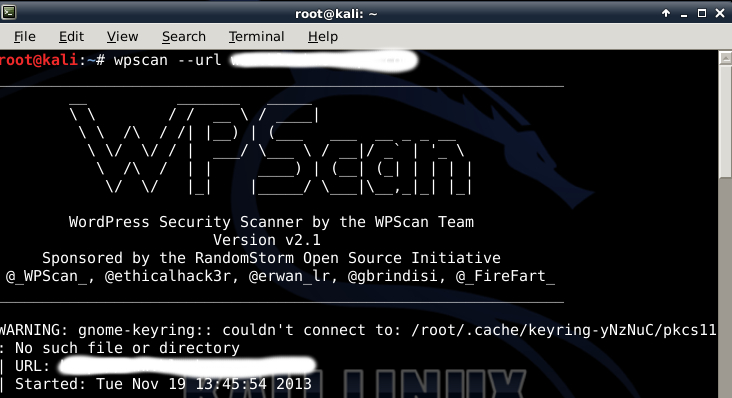
How to fix WARNING: gnome-keyring:: couldn’t connect to: /root/.cache/keyring-yNzNuC/pkcs11: No such file or directory?
Posted by krishna in: Kali Linux LinuxCouple of days back I was trying to run WPSCAN and I received an interesting warning on my XFCE Desktop.
WARNING: gnome-keyring:: couldn't connect to: /root/.cache/keyring-yNzNuC/pkcs11: No such file or directory?. The warning doesn’t actually stops me from doing anything, but I was obviously curious and found that I had exactly the same WARNING: gnome-keyring on my LXDE Desktop as well. This was not the same on my GNOME Desktop.How to fix WARNING: gnome-keyring issue
I get this warning when I try to run wpscan.
WARNING: gnome-keyring:: couldn't connect to: /root/.cache/keyring-XxxXxXx/pkcs11: No such file or directory
WPSCAN and quick wordpress security – Fixing Direcroty Listing – Part 2
Posted by krishna in: Kali Linux Linux
This is a part 2 of the guide WPSCAN and quick wordpress security. It guides reader on how to fix Directory listing in WordPress. Read part 1 here WPSCAN and quick wordpress security – Part 1
Run WPSCAN
WPSCAN shows I have Directory listing enabled.
WPSCAN and quick wordpress security
Posted by krishna in: Kali Linux Linux
This is a quick and simple guide utilizing wpscan to scan wordpress and fix some security issues. Very simple and easy to follow.
Readers: Please read WPSCAN and quick wordpress security – Fixing Direcroty Listing – Part 2 of this series that outlines on how to fix Directory Listing.
A simple WPSCAN done on my site:
# wpscan --url www.blackmoreops.com
How to install/remove GNOME Desktop Environment on Kali Linux
Posted by krishna in: Kali Linux Linux
GNOME is a desktop environment and graphical user interface that runs on top of a computer operating system. It is composed entirely of free and open source software and is developed by both volunteers and paid contributors, the largest corporate contributor being Red Hat. It is an international project that includes creating software development frameworks, selecting application software for the desktop, and working on the programs that manage application launching, file handling, and window and task management.
Initially, “GNOME” was an acronym of GNU Network Object Model Environment, referring to the original intention of creating a distributed object framework similar to Microsoft’s OLE; it was dropped, because this no longer reflects the core vision of the GNOME project.
Fixing PulseAudio configured for per-user sessions … (warning) in Kali Linux and Debian
Posted by krishna in: Kali Linux LinuxWhat is PulseAudio:

PulseAudio is a sound system for POSIX OSes, meaning that it is a proxy for your sound applications. It allows you to do advanced operations on your sound data as it passes between your application and your hardware. Things like transferring the audio to a different machine, changing the sample format or channel count and mixing several sounds into one are easily achieved using a sound server.
It is an integral part of all relevant modern Linux distributions (Debian, Kali Linux etc.) and used in various mobile devices by multiple vendors.
Fix sound mute in Kali Linux on boot
Posted by krishna in: Kali Linux LinuxIf you’ve installed Kali Linux then you already know that the sound option is mute or disabled at the boot. No matter what you do, next time you restart Kali Linux, you will again have sound mute in Kali Linux on boot. You might want to start Kali Linux with a great sound effect (Ka-BOOM!!) or you probably spend a few moments to unmute sound and then turn on the volume. After sometime, this gets annoying and you start looking into the wide world of web (actually the correct term is World Wide Web aka WWW but you already knew that!) and ended up here. So let’s not wait more and get into command line to fix this issue once and for all.
In this guide we will fix 2 things
How to Install Flash in Kali Linux
Posted by krishna in: Kali Linux Linux
This is a small guide with instructions that users can copy paste and make Flash work in their Kali Linux. Copy paste supported instruction to make life simpler.
There’s two different ways you can install flash in Kali Linux:
- Install Flash from Repository – Usually works
- Install Flash Manually – For the rest failed at step 1
Now lets move on to instructions …
How to Install Java JDK in Kali Linux
Posted by krishna in: Kali Linux LinuxPOST UPDATED with latest version of Java: 18/12/2013.
How to Install Java JDK in Kali Linux
This is a small guide with instructions that users can copy paste and make Java work in their Kali Linux. Thanks to purehate for providing original instructions. I’ve modified his instruction to suit my needs and I hope this will benefit users as well.
So lets get on with this guide…
How to fix Kali Linux apt-get slow update?
Posted by krishna in: Kali Linux LinuxThis is a small guide on How to fix Kali Linux apt-get slow update.
Kali is relatively new and got fewer Mirrors than some other distro’s. That means less servers to download from and less servers means more people trying to download from them and using all bandwidth. So when you type in apt-get update, you see a slow download speed for packages. This just means you’re connected to a server that’s really busy. Some users complains that nothing happens or they are not getting any updates at all. Some got different issues like update stuck is header and doesn’t move any further.
To fix this, you need to check a few things:
- Check if you have the right repositories is your /etc/apt/sources.list
- Remove unwanted or unsupported repositories.
- Clean apt-get cache.
- Choose a fast DNS server.
How to add official Kali Linux Repositories?
Posted by krishna in: Kali Linux Linux
Kali Linux source.list Repositories page: Official Link
We’ve seen many people break their Kali Linux installations by following unofficial advice, or arbitrarily populating their sources.list file with unneeded repositories. The following post aims to clarify what repositories should exist in sources.list, and when they should be used.
Any additional repositories added to the Kali sources.list file will most likely BREAK YOUR KALI LINUX INSTALL.
The simplest way is to edit the
/etc/apt/sources.list remove or comment every-line with # at the front and add the following lines..How to fix Wired Network interface “Device not managed” error in Debian or Kali Linux?
Posted by krishna in: Kali Linux Linux
Device not managed error actually is an interesting error. When I tested, Device not managed error only happened to Wired Network interfaces (such as eth0 or eth1) in both Debian and Kali Linux. It doesn’t seem to happen to wireless network interfaces. When a user connects their Laptop or Computer to a LAN cable, suddenly they get this Wired Network interface “Device not managed error” and they can’t browse internet. It is annoying and particularly confusing as the error goes not make it obvious how it was generated. Most people end up searching for “Firefox can’t connect to Internet” or “Unable to browse internet in Kali Linux” or such. Those search strings will take to nowhere. This guide takes you through step by step procedures on fixing “Wired Network interface Device not managed error” in Debian and Kali Linux.
CLI ifconfig – How to setup IP addess from Command Line in Linux
Posted by krishna in: Kali Linux Linux
Did you even had trouble with Network Manager or ifconfig and felt that you need to try to set up static IP address from command line / CLI ifconfig? I accidentally removed Gnome (my bad, wasn’t paying attention and did an apt-get autoremove -y .. how bad is that.. ) So I had a problem, I can’t connect to Internet to reinstall my Gnome Network Manager cause I’m in TEXT mode. Similarly I broke my network manager cause I was trying to use VPN and it just wouldn’t come back. I tried reinstalling it, but you need Internet for that. So here’s a small guide for that you can setup IP address and networking from Linux Command Line or CLI. You’ll be able to browse it from your mobile device and make things work.


 Posts
Posts